Showing posts with label Internet. Show all posts
Showing posts with label Internet. Show all posts
1
Every body in the world are being Addicted to Internet now a days (me too). But they cant tolerate the amount they spend for Internet connections. Surely internet is a great place to gather new Information, Share ideas, Making friends etc. Now we are giving you a Trick to get Free Internet from your PC or Laptop with your AirTel sim.
Now make sure, you have less balance in your account ( below 10 paise ). Now connect to Internet using the phone. Now you have to adjust some settings on your Browser. For that you should read our previous articles
read more
Trick To Get Free Internet On Computer with AirTel
 |
| Free Internet for Computer |
- Airtel Sim Card
- Computer (PC, Laptop, Tablet anything)
- Web Browser
- Mobile Phone ( or any thing used to connect internet via a SIM )
Now make sure, you have less balance in your account ( below 10 paise ). Now connect to Internet using the phone. Now you have to adjust some settings on your Browser. For that you should read our previous articles
0
read more
Get Airtel Free Internet on Android Devices
I will explain a short paragraph about this trick.
This Trick works with opera Mobile Browser. Whats special about it ? Just think... You will get the answer. Don't you get it ??? Then I will say.
The speciality of opera mobile is that, you can set proxy servers. Ya thats the main logic behind this trick. I am going to explain How to set Proxy on Opera Mobile [ Android ].
This Trick works with opera Mobile Browser. Whats special about it ? Just think... You will get the answer. Don't you get it ??? Then I will say.
The speciality of opera mobile is that, you can set proxy servers. Ya thats the main logic behind this trick. I am going to explain How to set Proxy on Opera Mobile [ Android ].
Get ready with Airtel settings :
- Activate airtel Internet settings.
- If you don't have it, Just send MO to 543210. Then you will get configurations from Airtel.
- Download and install opera Mobile for Android. If you don't have it, click here to download from Android Market.
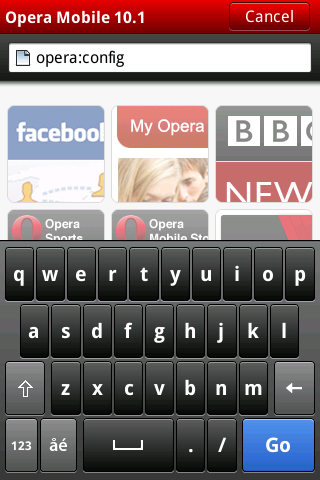
- Open Opera Mobile and type opera:config in the address bar and press go.
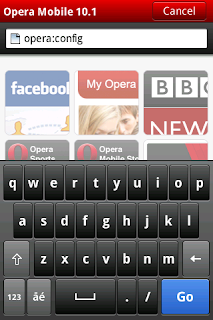
- Now you will get preference editor.
- Scroll Down and click Proxy.
- Now scroll down again and you can see the fields to enter HTTP and HTTPS server.
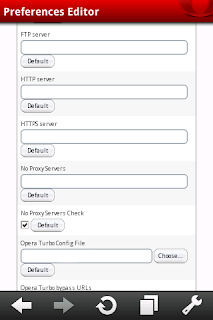
- Now you can provide the required proxy server there in the format proxy:port.
If you want to input a proxy 203.112.115.5 and port 80
Then you can enter it as 203.115.112.5:80 - If you provided proxies, Scroll down until you get Use HTTP and Use HTTPS and tick both check boxes.
- Now scroll down and press SAVE.
Done editing proxy.

0

Requirements for Installation-UC Web
Requirements for Installation-Opera Mini
https://www.dropbox.com/s/r6vjounm2onygcy/Opera_Mini_TrickSmash.com.jar
https://www.dropbox.com/s/ahfkqezaaqb9pr3/UC_Browser_82_TrickSmash.com.jar
I must mention the source of these awesome browsers here.
It will work for every Airtel SIM whether it’s blocked or not at free of cost. Do let me know if you have any error while installing these browsers. I’m always here to help you. Also please give us a hand to share this post to encourage us to get more exclusive stuffs from Only Trick, the leading tech-tricks blog.
read more
Airtel Free GPRS Trick 2012(working)

Requirements for Installation-UC Web
- UC Browser won’t initialize with zero balance. So install it with some balance or GPRS packs.
- After initializing UC, move to settings and change “Change ME” option to the second option.
- Then UC web is ready to launch. Restart the browser and start using high speed Airtel free GPRS.
Requirements for Installation-Opera Mini
- It will install with zero balance. Just run though.!!
- Use default MO settings to get downloading and actual speed.
- Download Opera Mini by TrickSmash here.
https://www.dropbox.com/s/r6vjounm2onygcy/Opera_Mini_TrickSmash.com.jar
- Download UC by TrickSmash here
https://www.dropbox.com/s/ahfkqezaaqb9pr3/UC_Browser_82_TrickSmash.com.jar
I must mention the source of these awesome browsers here.
It will work for every Airtel SIM whether it’s blocked or not at free of cost. Do let me know if you have any error while installing these browsers. I’m always here to help you. Also please give us a hand to share this post to encourage us to get more exclusive stuffs from Only Trick, the leading tech-tricks blog.
29
 If you like to watch TV every time and also don't want to miss your favorite channels even if not in home or in office than following website for free online live TV channels surely for you. The following websites for Live streaming TV, live news, free internet online TV stations, and videos from all over the world online in full screen and completely free. You can enjoy the cricket in your favorite sport channels live too. Almost all channels are available here in different site for any type of viewing like Music, News, Sports, Education, Hindi, and regional like Tamil, Malayalam, Telugu etc and even International channels.
(To enjoy Live Cricket World Cup 2011 right now visit: http://www.livetvchannelsfree.net/starsports.html)
All common and famouse channels are available here in sites like:
Family and Entertainment Channels: Sony TV, Star Plus, Zee TV, Star One, SAB TV, Zee Cinema, Star Gold, Zoom, Set Max, Colors TV, UTV Movies, SaharaFilmy, B4U Movies, NDTVImagine, Zee Music, MTV India, B4U Music, Cartoon Network, Nickelodeon etc.
News channels: Star News, AajTak, Star News, NDTV 247, Zee News, NDTV India, NDTV Profit, India TV, HMTV News, News X, ET NOW, Live India, DD News, 9X News, NDTV Good, News 9, AETCPunjabi etc.
Sport Channels: Ten Sport, Zee sports, Star Cricket, Star sports, espn sports, euro sports, baseball tv, bme sports, Wresltling Live etc.
Regional Channels: PTC Punjabi, Zee Punjabi, Aastha TV, AasthaIndia, Bhajan, ETV Bangla, TV9 Telugu, INewsTelugu, Star Ananda, Star Majha, etc.
Also some site providing channels for Pakistani, Bangladeshi, Sri Lankan, Nepali etc.
Here the List for Websites to Watch Indian Television Channels Online for Free:
http://www.livetvchannelsfree.net/: This site has all channels available free on the internet. The largest collection of online Indian tv channels available on the Web. This website contains a large number of tv channels. The channels are being accordingly catagorized for your easy viewing for viewing Free Internet Television.
http://www.tvchannelsfree.com/channels/36/India: Watch online Indian TV channels. Try out channels like Smash Hits, NDTV, CNBC, ASIAnet News, Star Majha and more other. Some channels may not work in your country / network.
http://www.indiagalaxy.com: This site offer a lots of free online streams Indian TV Channels. The site is pretty neat and it has a list of channels listed on the left and the player is on the right. You can watch Telugu channels, Zee Cinema, Zee TV, Sony, SET Max, Star Plus, Star One, Zoom India, Filmy and many more indian tv channels online for free. Sometimes may not load channel when you select from list than just re-open homepage and it'll auto play.
http://tvfun.in: This site has large collection for watch tv online free from anywhere of the world your fevorite live indian tv channels on your computer also Watch hindi serials online and indian television for free. Free sports tv channels online , watch live cricket on your pc , tamil tv channels online streaming , hindi tv channels online etc.
http://alltimetv.net/: This site offer for wathc Indian Tv Channles, All Tv Channel, Pakistan Tv Channels, Srilanka Tv Channels, Nepal Tv Channels, Bangladesh Tv Channels, World Tv Channels.
http://www.onlinemedia.in: This site also providing some of useful channels like Live cricket, Indian TV Channels, Movies & More.
http://www.megaindiantv.com: MegaIndianTV is a free TV-portal .... Watch here all the Indian Channels , 24*7 Entertainment Free.
http://www.idesitv.com: Home Of South Asian Entertainment. You can choose The Channel You Like To Watch Any Enjoy. Click on the channel and a popup window will open up.
http://www.krazycommunity.com: This site offer to enjoy hindi serials online, Hindi/English/Tamil/Telugu movies free, search and listen music. This site also offer to watch old episode or recording for desi TV serials , bollywood and hollywood movies, matches etc. You can find latest episodes of tv serials of Star Plus, Zee TV, Sony, Color TV and many more.
http://www.djzaki.com/webtv/: This site has few online channels but you can watch videos clippings from these Indian Channels.
http://www.watchfomny.com: This site also has lots of channels in different categories.
http://www.nepalisite.com/tv : This site also has few channels but the quality is good.
http://www.desitvstreams.com/: This site has many Indian channels online for free and other private channels to buy. Free Indian Channels, Free Pak Channels, VIP Pack, Live Sport Channels.
http://www.yupptv.com: Watch your favourite TV Channels Live on Internet enabled devices like PC, ROKU, iPhone & iPad, XBox, PS3, Wii, Netgear with your existing subscription on YuppTV Anytime...Anywhere! But only few are free and other need to subscribe.
Some website may only compatible with Mozilla Firefox or Internet Explorer also may ask you to download extra plugin like Microsoft silverlight or others which needed to stream and watch online video. Some site may require free registration for free to used. All tested my me and working fine. Most of them working fine in Firefox or Google Chrome.
If you want to see the online TV program listing try burrp!TV, an online TV guide for India. It's a fun and easy way to discover what's playing on TV. You can also set SMS or e-mail reminders, track your favourite shows and do a lot more
.
read more
Collection Of Websites to Watch Indian Television Channels Free Online
(To enjoy Live Cricket World Cup 2011 right now visit: http://www.livetvchannelsfree.net/starsports.html)
All common and famouse channels are available here in sites like:
Family and Entertainment Channels: Sony TV, Star Plus, Zee TV, Star One, SAB TV, Zee Cinema, Star Gold, Zoom, Set Max, Colors TV, UTV Movies, SaharaFilmy, B4U Movies, NDTVImagine, Zee Music, MTV India, B4U Music, Cartoon Network, Nickelodeon etc.
News channels: Star News, AajTak, Star News, NDTV 247, Zee News, NDTV India, NDTV Profit, India TV, HMTV News, News X, ET NOW, Live India, DD News, 9X News, NDTV Good, News 9, AETCPunjabi etc.
Sport Channels: Ten Sport, Zee sports, Star Cricket, Star sports, espn sports, euro sports, baseball tv, bme sports, Wresltling Live etc.
Regional Channels: PTC Punjabi, Zee Punjabi, Aastha TV, AasthaIndia, Bhajan, ETV Bangla, TV9 Telugu, INewsTelugu, Star Ananda, Star Majha, etc.
Also some site providing channels for Pakistani, Bangladeshi, Sri Lankan, Nepali etc.
Here the List for Websites to Watch Indian Television Channels Online for Free:
http://www.livetvchannelsfree.net/: This site has all channels available free on the internet. The largest collection of online Indian tv channels available on the Web. This website contains a large number of tv channels. The channels are being accordingly catagorized for your easy viewing for viewing Free Internet Television.
http://www.tvchannelsfree.com/channels/36/India: Watch online Indian TV channels. Try out channels like Smash Hits, NDTV, CNBC, ASIAnet News, Star Majha and more other. Some channels may not work in your country / network.
http://www.indiagalaxy.com: This site offer a lots of free online streams Indian TV Channels. The site is pretty neat and it has a list of channels listed on the left and the player is on the right. You can watch Telugu channels, Zee Cinema, Zee TV, Sony, SET Max, Star Plus, Star One, Zoom India, Filmy and many more indian tv channels online for free. Sometimes may not load channel when you select from list than just re-open homepage and it'll auto play.
http://tvfun.in: This site has large collection for watch tv online free from anywhere of the world your fevorite live indian tv channels on your computer also Watch hindi serials online and indian television for free. Free sports tv channels online , watch live cricket on your pc , tamil tv channels online streaming , hindi tv channels online etc.
http://alltimetv.net/: This site offer for wathc Indian Tv Channles, All Tv Channel, Pakistan Tv Channels, Srilanka Tv Channels, Nepal Tv Channels, Bangladesh Tv Channels, World Tv Channels.
http://www.onlinemedia.in: This site also providing some of useful channels like Live cricket, Indian TV Channels, Movies & More.
http://www.megaindiantv.com: MegaIndianTV is a free TV-portal .... Watch here all the Indian Channels , 24*7 Entertainment Free.
http://www.idesitv.com: Home Of South Asian Entertainment. You can choose The Channel You Like To Watch Any Enjoy. Click on the channel and a popup window will open up.
http://www.krazycommunity.com: This site offer to enjoy hindi serials online, Hindi/English/Tamil/Telugu movies free, search and listen music. This site also offer to watch old episode or recording for desi TV serials , bollywood and hollywood movies, matches etc. You can find latest episodes of tv serials of Star Plus, Zee TV, Sony, Color TV and many more.
http://www.djzaki.com/webtv/: This site has few online channels but you can watch videos clippings from these Indian Channels.
http://www.watchfomny.com: This site also has lots of channels in different categories.
http://www.nepalisite.com/tv : This site also has few channels but the quality is good.
http://www.desitvstreams.com/: This site has many Indian channels online for free and other private channels to buy. Free Indian Channels, Free Pak Channels, VIP Pack, Live Sport Channels.
http://www.yupptv.com: Watch your favourite TV Channels Live on Internet enabled devices like PC, ROKU, iPhone & iPad, XBox, PS3, Wii, Netgear with your existing subscription on YuppTV Anytime...Anywhere! But only few are free and other need to subscribe.
Some website may only compatible with Mozilla Firefox or Internet Explorer also may ask you to download extra plugin like Microsoft silverlight or others which needed to stream and watch online video. Some site may require free registration for free to used. All tested my me and working fine. Most of them working fine in Firefox or Google Chrome.
If you want to see the online TV program listing try burrp!TV, an online TV guide for India. It's a fun and easy way to discover what's playing on TV. You can also set SMS or e-mail reminders, track your favourite shows and do a lot more
.
0
 Nokia Internet Radio is a free application made by Nokia Beta Labs to stream radio using WLAN or 2G/3G network. With Nokia Internet Radio application in Series40 phones you can have access to the Nokia Internet Radio service and its tens of thousands of stations worldwide for free.
Updated December 14, 2010: An updated release v.1.0.3 Features:
~Listen to tens of thousands of Internet radio stations
~Search stations by name, genre, language, or location
~Manage your favourites
~Play the Internet radio in background
~Search and purchase music Ovi Music (supported stations only)
~Please check out this blog post for the more details.
Installation Method:

~Download the .zip file to your PC and extract the .jar and .jad files to a folder on your PC. Or can directly in phone using any file manager like Mini Commander.
~Now access the Phone memory or Memory card through PC.
~Copy the jar and jad in the Phone memory/Memory card.
~Now disconnect the USB cable and browse the location where .jad and .jar is saved in the mobile device.
~The client gets installed automatically.
~In either way both .jad and .jar have to be sent to your mobile device.
Recommend that you connect over WLAN or 2G/3G network with a data plan to avoid excessive costs. The client is specially designed for devices with Series 40 6th Edition (or above) operating system and portrait QVGA screen.
Download Nokia Internet Radio for Series 40 Phones:
Nokia Internet Radio v1.03-S40-Touch.zip (211 KB)
Nokia Internet Radio v1.01-S40-NonTouch.zip (208 KB)
read more
Download Nokia Internet Radio for Series 40 Phones
Nokia Internet Radio is a free application made by Nokia Beta Labs to stream radio using WLAN or 2G/3G network. With Nokia Internet Radio application in Series40 phones you can have access to the Nokia Internet Radio service and its tens of thousands of stations worldwide for free. Updated December 14, 2010: An updated release v.1.0.3 Features:
~Listen to tens of thousands of Internet radio stations
~Search stations by name, genre, language, or location
~Manage your favourites
~Play the Internet radio in background
~Search and purchase music Ovi Music (supported stations only)
~Please check out this blog post for the more details.
Installation Method:
~Download the .zip file to your PC and extract the .jar and .jad files to a folder on your PC. Or can directly in phone using any file manager like Mini Commander.
~Now access the Phone memory or Memory card through PC.
~Copy the jar and jad in the Phone memory/Memory card.
~Now disconnect the USB cable and browse the location where .jad and .jar is saved in the mobile device.
~The client gets installed automatically.
~In either way both .jad and .jar have to be sent to your mobile device.
Recommend that you connect over WLAN or 2G/3G network with a data plan to avoid excessive costs. The client is specially designed for devices with Series 40 6th Edition (or above) operating system and portrait QVGA screen.
Download Nokia Internet Radio for Series 40 Phones:
Nokia Internet Radio v1.03-S40-Touch.zip (211 KB)
Nokia Internet Radio v1.01-S40-NonTouch.zip (208 KB)
1
 Bharat Sanchar Nigam Ltd (BSNL) has launched the micro SIM cards which is specifically designed for Apple devices such as Apple iPad 3G, Apple iPhone 4 or any other devices which support micro SIM card. Also announced different 3G Data plans for same.
Sanjay Kunal, General Manager Sales of BSNL said, "BSNL "The BSNL is beginning the new scheme in collaboration with apple for which both prepaid and postpaid data plans have been introduced along with micro SIM card. Specially tailored Tariff for the Unlimited 3G Data plan for Apple devices starts for just Rs 99 to Rs 999 without any data cap or Fair Usage Policy (FUP)."
BSNL Micro SIM Kit will cost Rs. 100 which divided as Rs. 30 for the Micro sim and Rs.70 for the 3G FRC Starter Plan. This SIMs will available in 3G services area only. The BSNL Micro SIM card and 3G tariff plan for Apple Devices will be available only from BSNL CSC.
Prepaid Tariff Details for BSNL 3G Micro SIM:

Postpaid Tariff Details for BSNL 3G Micro SIM:

The new Micro SIM that also known as a 3FF SIM, is a diminutive 12 x 15mm, about 52% smaller than the standard SIM card. The actual reason why micro SIM is being introduced is very unclear. Some valid reasons quoted are to reduce the physical space required for the SIM card and to differentiate SIMs for data-only devices. The standard SIM has a size of 15 x 25mm plastic card.
read more
BSNL Launches Micro SIM Card For Apple Devices With Unlimited 3G Plan
Bharat Sanchar Nigam Ltd (BSNL) has launched the micro SIM cards which is specifically designed for Apple devices such as Apple iPad 3G, Apple iPhone 4 or any other devices which support micro SIM card. Also announced different 3G Data plans for same. Sanjay Kunal, General Manager Sales of BSNL said, "BSNL "The BSNL is beginning the new scheme in collaboration with apple for which both prepaid and postpaid data plans have been introduced along with micro SIM card. Specially tailored Tariff for the Unlimited 3G Data plan for Apple devices starts for just Rs 99 to Rs 999 without any data cap or Fair Usage Policy (FUP)."
BSNL Micro SIM Kit will cost Rs. 100 which divided as Rs. 30 for the Micro sim and Rs.70 for the 3G FRC Starter Plan. This SIMs will available in 3G services area only. The BSNL Micro SIM card and 3G tariff plan for Apple Devices will be available only from BSNL CSC.
Prepaid Tariff Details for BSNL 3G Micro SIM:
Postpaid Tariff Details for BSNL 3G Micro SIM:

The new Micro SIM that also known as a 3FF SIM, is a diminutive 12 x 15mm, about 52% smaller than the standard SIM card. The actual reason why micro SIM is being introduced is very unclear. Some valid reasons quoted are to reduce the physical space required for the SIM card and to differentiate SIMs for data-only devices. The standard SIM has a size of 15 x 25mm plastic card.
0
 Tata Teleservices and Acer have joined hand to launch the Aspire One AOD 260 netbook in India.The netbook comes Tata Indicom Photon Plus embedded inside which allows internet access uptp 3.1 Mbps speed. Acer has partnered with Tata Teleservices to offer its popular new Aspire One netbook for a price of Rs. 17,999 in India.
The Acer Aspire One D260 specifications:
Display: 10.1-inch LED-backlit LCD (16:9 aspect ratio)
CPU: Intel Atom N450 1.66GHz
Webcam: 1.3MP
Memory: 1GB DDR2
Storage: 160GB 5400RPM
Battery: 6-cell – 8 hour life
OS: Windows 7 Starter
Connectivity: Bluetooth, 3xUSB 2.0, Wi-Fi b/g/n, multi-card reader, VGA, 10/100 Ethernet, 3.1Mbps Tata Photon+ 3G Wireless.
Mr Lloyd Mathias, President, Corporate Monitoring Group, Tata Teleservices Limited, said at launch event, “Partnering with Acer India enables us to provide customers with a compelling proposition—that of accessing the Internet at blazing speeds on the Photon Plus platform, making for a new and invigorating computing experience on the feature rich Aspire One. The Acer Netbook will herald a new era in versatile computing, and is in keeping with TTSL’s endeavor to provide affordable and ubiquitously accessible high-speed Internet access to its customers. We are confident that the partnership will bring to the Indian market an innovative solution that offers a world-class computing experience and ubiquitous broadband connectivity”.
The Aspire One netbook will currently available only in Mumbai and New Delhi and soon be available at other stores in India. Data plans are identical with regular Tata Photon Plus tariffs, however, users will get the first two months free of charge, with a 5GB download limit.
Mr. S. Rajendran, Chief Marketing Officer, Acer India opined, “Ever since the launch of netbooks in India, the market has been displaying tremendous growth for mobile computing devices. Acer, known to break new ground in launching fresh technology, has yet again brought a consumer friendly netbook AspireOne D260 which provides embedded broadband connectivity at ease. With this launch, we will be in a position to adapt to the ever changing needs of our consumers. Acer’s embedded broadband netbook with a multitude of attendant benefits like longer battery-life, convenience, tighter integration, security and lower TCO will surely be a great welcome in the marketplace. This smooth and slender lightweight netbook is a great solution for Internet mobility.”
The Acer Aspire One is priced in India at Rs 17,999 excluding taxes and will be available in Delhi and Mumbai initially.
read more
Acer Launches Aspire One Netbook with Tata Photon Plus Inside at Rs. 17,999
 Tata Teleservices and Acer have joined hand to launch the Aspire One AOD 260 netbook in India.The netbook comes Tata Indicom Photon Plus embedded inside which allows internet access uptp 3.1 Mbps speed. Acer has partnered with Tata Teleservices to offer its popular new Aspire One netbook for a price of Rs. 17,999 in India.
The Acer Aspire One D260 specifications:
Display: 10.1-inch LED-backlit LCD (16:9 aspect ratio)
CPU: Intel Atom N450 1.66GHz
Webcam: 1.3MP
Memory: 1GB DDR2
Storage: 160GB 5400RPM
Battery: 6-cell – 8 hour life
OS: Windows 7 Starter
Connectivity: Bluetooth, 3xUSB 2.0, Wi-Fi b/g/n, multi-card reader, VGA, 10/100 Ethernet, 3.1Mbps Tata Photon+ 3G Wireless.
Mr Lloyd Mathias, President, Corporate Monitoring Group, Tata Teleservices Limited, said at launch event, “Partnering with Acer India enables us to provide customers with a compelling proposition—that of accessing the Internet at blazing speeds on the Photon Plus platform, making for a new and invigorating computing experience on the feature rich Aspire One. The Acer Netbook will herald a new era in versatile computing, and is in keeping with TTSL’s endeavor to provide affordable and ubiquitously accessible high-speed Internet access to its customers. We are confident that the partnership will bring to the Indian market an innovative solution that offers a world-class computing experience and ubiquitous broadband connectivity”.
The Aspire One netbook will currently available only in Mumbai and New Delhi and soon be available at other stores in India. Data plans are identical with regular Tata Photon Plus tariffs, however, users will get the first two months free of charge, with a 5GB download limit.
Mr. S. Rajendran, Chief Marketing Officer, Acer India opined, “Ever since the launch of netbooks in India, the market has been displaying tremendous growth for mobile computing devices. Acer, known to break new ground in launching fresh technology, has yet again brought a consumer friendly netbook AspireOne D260 which provides embedded broadband connectivity at ease. With this launch, we will be in a position to adapt to the ever changing needs of our consumers. Acer’s embedded broadband netbook with a multitude of attendant benefits like longer battery-life, convenience, tighter integration, security and lower TCO will surely be a great welcome in the marketplace. This smooth and slender lightweight netbook is a great solution for Internet mobility.”
The Acer Aspire One is priced in India at Rs 17,999 excluding taxes and will be available in Delhi and Mumbai initially.
Subscribe to:
Posts (Atom)


