Showing posts with label Run Java Application of Your Mobile in PC. Show all posts
Showing posts with label Run Java Application of Your Mobile in PC. Show all posts
1
 Yes you can run Java Application which you enjoying in your Mobile Phone in PC using KEmulator Lite. Any web browser or game you running in mobile also can enjoy same in PC. KEmulator is a wonderful and easy to use application which provides that feature. KEmulator supports Cookie remembering, File downloading, Page saving, Proxy support and a little setup.
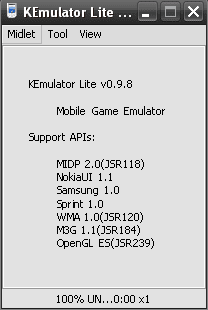
1st download zip file KEmulator Lite from link in end of article, and unzip it in any drive or in program file in C: drive. Now create a shortcut of file "KEmulator.exe" at desktop. Now run this file and you will see the following image.
read more
Run Java Application of Your Mobile in PC using KEmulator
 Yes you can run Java Application which you enjoying in your Mobile Phone in PC using KEmulator Lite. Any web browser or game you running in mobile also can enjoy same in PC. KEmulator is a wonderful and easy to use application which provides that feature. KEmulator supports Cookie remembering, File downloading, Page saving, Proxy support and a little setup.
 1st download zip file KEmulator Lite from link in end of article, and unzip it in any drive or in program file in C: drive. Now create a shortcut of file "KEmulator.exe" at desktop. Now run this file and you will see the following image.
Remember also if you already not have installed JRE ( Java RunTime Environment) than 1st install JRE than run KEmulator. You can find the link to download JRE at end of article.
Now goto Midlet - Load Jar from KEmulator menu.
Now goto Midlet - Load Jar from KEmulator menu.
Select any java application (.jar file) and click on Open. The file will load and start to run for first initialization.
After this you're ready to enjoy your lovely mobile java software in your PC same way in mobile.
Subscribe to:
Posts (Atom)


