1


Then nothing to worry. Just install it and open it.
Note: Recommended to use at low balance Even though it is tested and found to be working at higher balance, It is recommended to use at low balance for avoiding balance loss.
read more
New UC Browser 8.6 hacked for Airtel free internet

New Features
- New and Improved User Interface of the Home screen and Menu.
- Highly Optimized for full touch screen phones.
- Optimized Switch and Multi tab options.
- High improvement in Input methods.
- Optimized Key board for Touch screen phones.
- Brightness Adjusting feature came Back.
- Supported Sharing of Images to FaceBook.
- New Virtual keyboard
Instructions
First, Download and Install UC Browser 8.6 hacked handler mod for Airtel from below.
Download Mirrors
- Jumbofiles
- Direct Link (sites.google.com)
More mirrors will be available soon.
Then nothing to worry. Just install it and open it.
Note: Recommended to use at low balance Even though it is tested and found to be working at higher balance, It is recommended to use at low balance for avoiding balance loss.
0

1.Open My Computer,
2.select the disk drive that you want to diagnose and repair.
3.Right click on it and select Properties
4.Go to Tools tab.
5.Click on the "Check Now" button under "Error Checking Status".
6.Depending up on your choice, choose either "Automatically fix file system errors" or "Scan for and Attempt Recovery of Bad Sectors."
7.Then click on Start.
read more
Remove Bad sector in Hard-disk without any tool

1.Open My Computer,
2.select the disk drive that you want to diagnose and repair.
3.Right click on it and select Properties
4.Go to Tools tab.
5.Click on the "Check Now" button under "Error Checking Status".
6.Depending up on your choice, choose either "Automatically fix file system errors" or "Scan for and Attempt Recovery of Bad Sectors."
7.Then click on Start.
0
read more
Free GPRS On Idea sept 2012
At first of all Call Your Customer Care From Your Idea Number,
And Ask Them To Activate MMS Service
If They Say,MMS Service is Preactivated Then Say Him To Deactivate Service.
Now call Again To Customer Care And Say To Activate MMS Service
Now Use APN- escotelmms In Your GPRS Setting And Keep Other Field Unchanged And Try To Connect Web
If it fails to connect then try 2-3 times more it will connect.
And Ask Them To Activate MMS Service
If They Say,MMS Service is Preactivated Then Say Him To Deactivate Service.
Now call Again To Customer Care And Say To Activate MMS Service
Now Use APN- escotelmms In Your GPRS Setting And Keep Other Field Unchanged And Try To Connect Web
If it fails to connect then try 2-3 times more it will connect.
0
read more
AIRCEL OFFICIAL BALANCE TRANSFER
Also aircel users beware of those user who are commenting like this
"FREE AIRCEL 3G AND 2G FOR SIX MONTHS AND BALANCE OF Rs.249.....JUST DIAL *122*666*4*9094336357*1# OR *122*666*3*9094336357*1# "
Here using balance transfer trick .The code*122*666*4*aircel mobile no to whom balance to be transferred*1#
Their is nothing new and you will loose your balance and the number mentioned here will be benefited , if you want to give someone some balance just use above code with his/her aircel mobile number
"FREE AIRCEL 3G AND 2G FOR SIX MONTHS AND BALANCE OF Rs.249.....JUST DIAL *122*666*4*9094336357*1# OR *122*666*3*9094336357*1# "
Here using balance transfer trick .The code*122*666*4*aircel mobile no to whom balance to be transferred*1#
Their is nothing new and you will loose your balance and the number mentioned here will be benefited , if you want to give someone some balance just use above code with his/her aircel mobile number
1

The first custom ROM ever made for Micromax funbook!
This ROM will work on all Ployer Momo9 clones and derivative devices from which Micromax funbook is the one
There were already faint rumors on this on air around XDA but its not a rumor anymore
Lets not talk too much, lets proceed with the specifications of JetMOD™ 5.0
What's new
What's Added/Removed
OMG!!! The features list is pretty long!!, Where is the link?
How to Flash this ROM?
read more
The first custom ROM ever made for Micromax funbook!
The first custom ROM ever made for Micromax funbook!
This ROM will work on all Ployer Momo9 clones and derivative devices from which Micromax funbook is the one
There were already faint rumors on this on air around XDA but its not a rumor anymore
Lets not talk too much, lets proceed with the specifications of JetMOD™ 5.0
What's new
Quote:
Quote:
|
What's Added/Removed
Quote:
Quote:
|

OMG!!! The features list is pretty long!!, Where is the link?
Link:
Quote:
Quote:
|

How to Flash this ROM?
Quote:
Quote:
|
0
 Hey everyone.......Want to give a complete look of ICS to ur phones till the real ICS comes over ? NOT A PROBLEM !!! Read the following one by one points nd end up getting that look !!
Below are the actual Trademarked names of applications, not anything general.....And to save some space on ur mobile, use Titanium Backup to remove the system default apps for the same purpose...do it only if u r confident that u wont screw up ur device....i m nt responsible for any loss !
1) INSTALL JET 3.0 ROM
http://androidforums.com/a75-all-things-root/539806-rom-jetmod-3-0-1st-flashable-rom-indiedevers-project-1st-rom-ota-updates-micromax-a75.html
2) APPLY THE ICS holo THEME
[THEME]Icecream Sandwich v1
3) INSTALL ICS LAUNCHER ( FROM MARKET)
4) INSTALL GOOGLE MUSIC ( FROM MARKET) [NOT TO BE REDISTRIBUTED BECAUSE OF LICENSE RESTRICTIONS]
5) INSTALL EXDIALER ( FROM MARKET ) AND APPLY ICS THEME
6) INSTALL ICECREAM SANDWITCH - ICS KEYBOARD (FROM MARKET)
7) INSTALL MOOD ICS LWP (FROM MARKET)
8) INSTALL GALLARY ICS ( FROM MARKET)
9) INSTALL CAMERA ICS ( FROM MARKET)
10) INSTALL ICS FILE EXPLORER
11) INSTALL ICS LOCKSCREEN ( FROM MARKET)
12) FOLLOW THIS TO CHANGE BUILD NUMBER TO 4.0.3
[HOW-TO] change BUILD-NUMBER - xda-developers
I WILL ADD THINGS AS PER REQUIREMENT !!
JET 3.0 ROM- varun.chitre15 (He wont refuse it :P )
ICS holo THEME- varun.chitre15(He wont refuse it :P )
[/COLOR]ICS LAUNCHER - Syndicate (Permission Obtained)
EXDIALER - Modooth (Permission Obtained)
GALLARY ICS -Moblynx (Permission Obtained) (Seems buggy, expect in higher versions)
CAMERA ICS - Moblynx (Permission Obtained)
ICS FILE EXPLORER -Doggie Team (Permission Requested)
ICS LOCKSCREEN -Swat devs (Permission Requested)
GOOGLE MUSIC - Google.inc (Permission Requested)
ICS KEYBOARD - VLLWP (Permission Requested)
MOOD ICS LWP - XLLUSION (Permission Requested)
Bootscreens - Amarghy (Permission Obtained ) (Testing )
read more
Complete ICS Makeover
Hey everyone.......Want to give a complete look of ICS to ur phones till the real ICS comes over ? NOT A PROBLEM !!! Read the following one by one points nd end up getting that look !!Below are the actual Trademarked names of applications, not anything general.....And to save some space on ur mobile, use Titanium Backup to remove the system default apps for the same purpose...do it only if u r confident that u wont screw up ur device....i m nt responsible for any loss !
1) INSTALL JET 3.0 ROM
http://androidforums.com/a75-all-things-root/539806-rom-jetmod-3-0-1st-flashable-rom-indiedevers-project-1st-rom-ota-updates-micromax-a75.html
2) APPLY THE ICS holo THEME
[THEME]Icecream Sandwich v1
3) INSTALL ICS LAUNCHER ( FROM MARKET)
4) INSTALL GOOGLE MUSIC ( FROM MARKET) [NOT TO BE REDISTRIBUTED BECAUSE OF LICENSE RESTRICTIONS]
5) INSTALL EXDIALER ( FROM MARKET ) AND APPLY ICS THEME
6) INSTALL ICECREAM SANDWITCH - ICS KEYBOARD (FROM MARKET)
7) INSTALL MOOD ICS LWP (FROM MARKET)
8) INSTALL GALLARY ICS ( FROM MARKET)
9) INSTALL CAMERA ICS ( FROM MARKET)
10) INSTALL ICS FILE EXPLORER
11) INSTALL ICS LOCKSCREEN ( FROM MARKET)
12) FOLLOW THIS TO CHANGE BUILD NUMBER TO 4.0.3
[HOW-TO] change BUILD-NUMBER - xda-developers
I WILL ADD THINGS AS PER REQUIREMENT !!
JET 3.0 ROM- varun.chitre15 (He wont refuse it :P )
ICS holo THEME- varun.chitre15(He wont refuse it :P )
[/COLOR]ICS LAUNCHER - Syndicate (Permission Obtained)
EXDIALER - Modooth (Permission Obtained)
GALLARY ICS -Moblynx (Permission Obtained) (Seems buggy, expect in higher versions)
CAMERA ICS - Moblynx (Permission Obtained)
ICS FILE EXPLORER -Doggie Team (Permission Requested)
ICS LOCKSCREEN -Swat devs (Permission Requested)
GOOGLE MUSIC - Google.inc (Permission Requested)
ICS KEYBOARD - VLLWP (Permission Requested)
MOOD ICS LWP - XLLUSION (Permission Requested)
Bootscreens - Amarghy (Permission Obtained ) (Testing
)
4

Prerequisites-
1. Micromax A75
2. ClockworkMOD recovery by me installed
3. NAND Backup made by the recovery just incase
2. Zipaligned all apks for better RAM utilization
3. Added init.d support
4. Added Adobe flash support
5. Unsecured boot image
6. Added VM tweaks
7. Added Supercharger script
8. Added RAM script for better multitasking
9. Forced Launcher into RAM memory
10. Enable hardware acceleration
12. GPU rendering enabled
13. Incremented network buffer values for faster network
14. Forced sleep when screen turned off for better battery life
15. Many battery related improvements
16. Added hosts file for block ads
17. Increased SD card cache size for faster SD card
18. Added Nano editor+sysro+sysrw
19. Added Bash- A better replacement for sh
20. Decreased the call ring delay to zero for instant call arrival
21. Increased wifi scans for better battery life
22. Enabled Stagefright support
23. Increased Dalvik heap size to 48mb
24. Added EXT2 support-WORKING!!!
25. OTA updates- From here updates will arrive directly to your phone now no more checking forums and downloading and flashing the update- Coolest feature-Thanks to aquariusoft
26. Added Link2sd
27. Added ADW Launcher
28. Based on Stock ROM by Micromax
29. Odexed the ROM for faster boot times
30. Added new boot and shutdown animations
31. Disabled boot sounds
32. Enabled Zipalign on boot
33. Enabled purgable assets
34. Added all regional languages support viz: Assamese, Bengali, Hindi, Oriya, Malayalam, Tamil, Telugu, Gujarati, Marathi, Hindi35.New Dirty ratios for better battery life
36. Debloated
37. Added Busybox38. Much more- will add when I rememberhttp://www.indiasporting.com/apks/Varun/A75/JetMODs/JetMOD_3.0.zip
How to install this?Well, here are the steps
1. Download the zip from above link
2. Dump it to SD card
3. Reboot to recovery
4. Factory reset
5. Wipe Dalvik Cache
6. Install zip from SD card
7. Fix permissions-This will take approximately 1 min
8. Reboot
9. You are travelling inside Jet 3.0
My mistake I forgot to add file manager
Don't worry, I am a good guy
I have made a flashable file manger for you all
After Installation just flash this
------Instructions to flash this------
1. Just install zip from SD card no need of other things
But this has to be done after installing JetMOD 3.0
Hey I want to reward you for your work how can I?Just press the Thanks button no need of reward or anything as such
File Integrity
MD5: 1E47B6C11D6F963893C3C466E2735738
SHA-256: 29F6F62C52391380EAEE33F50B3C4806DDE48936604935CBE7 9AF2BCB60EA560
Tiger: 4C67AB4F15689678675AE0B4000B65FC94E087F17D5ECB89
Whirlpool:D0B60FD947922CB462710B6D2493D180345FA952609B23B7FA 84C01872A4FDF8B6AEAF203E2ABCB9C3C50B11645BFDD8A35B 4253D49F39EC8ADAC9B6F59EC762
read more
1st ROM with OTA updates-Micromax A75
Prerequisites-
1. Micromax A75
2. ClockworkMOD recovery by me installed
3. NAND Backup made by the recovery just incase
----Features----
1. Pre-rooted2. Zipaligned all apks for better RAM utilization
3. Added init.d support
4. Added Adobe flash support
5. Unsecured boot image
6. Added VM tweaks
7. Added Supercharger script
8. Added RAM script for better multitasking
9. Forced Launcher into RAM memory
10. Enable hardware acceleration
12. GPU rendering enabled
13. Incremented network buffer values for faster network
14. Forced sleep when screen turned off for better battery life
15. Many battery related improvements
16. Added hosts file for block ads
17. Increased SD card cache size for faster SD card
18. Added Nano editor+sysro+sysrw
19. Added Bash- A better replacement for sh
20. Decreased the call ring delay to zero for instant call arrival
21. Increased wifi scans for better battery life
22. Enabled Stagefright support
23. Increased Dalvik heap size to 48mb
24. Added EXT2 support-WORKING!!!
25. OTA updates- From here updates will arrive directly to your phone now no more checking forums and downloading and flashing the update- Coolest feature-Thanks to aquariusoft
26. Added Link2sd
27. Added ADW Launcher
28. Based on Stock ROM by Micromax
29. Odexed the ROM for faster boot times
30. Added new boot and shutdown animations
31. Disabled boot sounds
32. Enabled Zipalign on boot
33. Enabled purgable assets
34. Added all regional languages support viz: Assamese, Bengali, Hindi, Oriya, Malayalam, Tamil, Telugu, Gujarati, Marathi, Hindi35.New Dirty ratios for better battery life
36. Debloated
37. Added Busybox38. Much more- will add when I remember
http://www.indiasporting.com/apks/Varun/A75/JetMODs/JetMOD_3.0.zip How to install this?Well, here are the steps
1. Download the zip from above link
2. Dump it to SD card
3. Reboot to recovery
4. Factory reset
5. Wipe Dalvik Cache
6. Install zip from SD card
7. Fix permissions-This will take approximately 1 min
8. Reboot
9. You are travelling inside Jet 3.0
My mistake
I forgot to add file managerDon't worry, I am a good guy
I have made a flashable file manger for you all
After Installation just flash this
------Instructions to flash this------
1. Just install zip from SD card no need of other things
But this has to be done after installing JetMOD 3.0
Hey I want to reward you for your work how can I?Just press the Thanks button no need of reward or anything as such
File Integrity
MD5: 1E47B6C11D6F963893C3C466E2735738
SHA-256: 29F6F62C52391380EAEE33F50B3C4806DDE48936604935CBE7 9AF2BCB60EA560
Tiger: 4C67AB4F15689678675AE0B4000B65FC94E087F17D5ECB89
Whirlpool:D0B60FD947922CB462710B6D2493D180345FA952609B23B7FA 84C01872A4FDF8B6AEAF203E2ABCB9C3C50B11645BFDD8A35B 4253D49F39EC8ADAC9B6F59EC762
1
 read more
3G Nexus 7 said to arrive in around six weeks
But it seems that will soon be remedied, as apparently a 3G model of the Nexus 7 is on its way. According to Paul O’Brien at MoDaCo, a 3G version of the Nexus 7 will launching in six weeks from now. The rest of the specifications are said to be identical to the current Nexus 7 tablet.
He did not have any information regarding the pricing and the launch date for the 3G model. It’s also unknown which markets this model will be released in, that is, if it will be limited to a single or multiple US carriers only. Hopefully, Google won’t do what they did with the Verizon Galaxy Nexus because that did not turn out well for anyone.
0

 read more
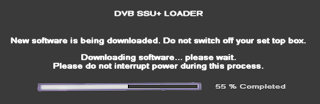
Trick to Update Airtel Digital TV Software Manually

How to Update ADTV STB Software Manually:
- First switch on your TV. Then your Digital TV set top box.
It should be strictly followed. First TV. Then STB. - Now you will see a notification on the TV Screen as like "Please wait Initializing.."
- Don't wait now. Immediately press exit button on ADTV remote twice.
- Now press 2465 immediately from our ADTV Remote controller.
- Then Downloading process will start.


0
read more
NEw Aircel new trick aug.2012
Hi Friend's.
This trick is working in Kerala, Tamilnadu
This trick is quite simple and is not a VPN or PROXY trick
Just follow the steps below
The speed lies between 550-750 Kbps
This trick is working in Kerala, Tamilnadu
This trick is quite simple and is not a VPN or PROXY trick
Just follow the steps below
- Just Dial *122*079# on your handset and press call button.
- A message will be received saying that "your 3 days 3g service has been activated..."
- On After 3 rd day repeat the above procedure again..
The speed lies between 550-750 Kbps
Subscribe to:
Posts (Atom)


